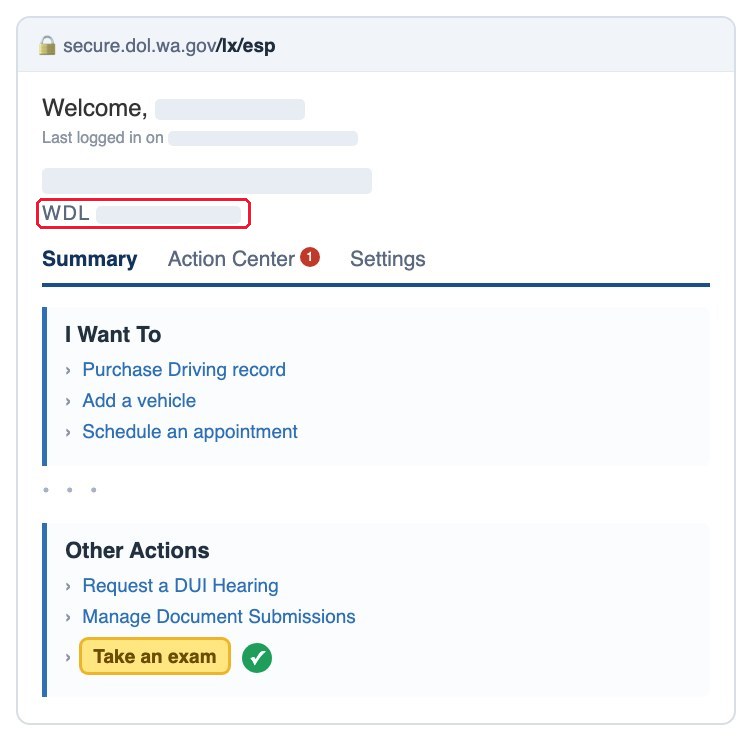
A WDL number is how the Washington DOL identifies you: 12 characters beginning with WDL. If you already hold a Washington driver license, instruction permit or state ID, the number is printed on the front of the card, on the line marked 4d LIC#. If you do not have a card yet, you can create the number yourself — free, in about ten minutes, on License Express. You need it before you can book a knowledge test or a road test.
The short answers
Cost: free. Creating a License Express account and being issued a WDL number costs nothing; you pay only later for the permit or the license itself.
Time: about ten minutes, online, no appointment and no office visit.
Where it is on your card: the front, on the line marked 4d LIC#. Numbers issued before August 2018 look different — built from your last name and initials instead of starting with WDL — and that number is still yours.
No Social Security Number? You can still be issued a number: on the personal information screen tap the No Social Security Number? link and keep going.
You do need a Washington street address to pre-apply. If you already hold a WA license, permit or ID, you do not pre-apply at all — the number is on your card.
On test day the same account is your exam entrance: log in to License Express and, under Other Actions, tap Take an exam.
Short version of this page, with photos of where the number sits on a card: What is a WDL number.
Nine steps, with the screen for each one
Already have a WA license, permit, or ID? The number is printed on the card — no need to pre-apply. Pre-applying requires a WA street address.
- Step 1 Open License Express (secure.dol.wa.gov) and click the green Create account.

- Step 2 Choose License Express for individuals, then Next.

- Step 3 Step 1 of 4 — enter your first and last name exactly as they appear on your ID.

- Step 4 Step 2 of 4 — pick a username (no spaces, at least 4 characters) and type your email twice.

- Step 5 Step 3 of 4 — set a password: at least 10 characters, using 3 of these — number, special character, uppercase, lowercase. It can\'t contain your username.

- Step 6 Step 4 of 4 — click the activation link DOL emails you (from [email protected] — check your spam folder), then come back and press Go to login.

- Step 7 After you log in: Do you have a WA licensing record? Answer Yes if any of these apply — you hold a WA license, ID or permit; you were issued a temporary license and are waiting for the card in the mail; you have pre-applied on dol.wa.gov before; you completed a driver training course in WA; you have been convicted of a moving violation in WA (not parking). If none apply, answer No. Not sure? Call 360.902.3900.

- Step 8 What would you like to apply for? → Personal Driver License. Standard or enhanced license/ID? → Standard (the enhanced one is for U.S. citizens only, so choose Standard if you are not a U.S. citizen).

- Step 9 Fill in your name, date of birth, and Social Security Number (no SSN? tap No Social Security Number?). At the end you get your number starting with WDL — write it down and enter it here.

- How to know you are really in You are in when the top says “Welcome, [your name]” and, at the very bottom of the page, Other Actions contains Take an exam — that is the link you click on test day, so if you can see it you are set.